


Categories

From Twitter


Windows 7 Professional SP1 64-bit
Update your Windows 7 Professional 64-bit installation disc


| License: | Trial Software |
|---|---|
| Operating Systems: | Windows 7 (32 bit) |
| Requirements: | A valid Windows product key (retail upgrade or full, OEM not supported) |
| Languages: | English |
| Software Cost: | Free |
| Date Updated: | 26 September 2011 |
|---|---|
| Watchlist: |
 Add download to my watchlist Add download to my watchlist
|
| Downloads To Date: | 79087 |
| Developer: | Microsoft |
| RSS News Feed: | http://blogs.technet.com/b/microsoft_blog/rss.aspx |
| Twitter Feed: | http://twitter.com/#!/windows |
| Facebook: | http://facebook.com/windows |
If you purchased a retail copy of Windows 7, chances are your installation disc didn’t come with SP1 included. That means if you want to reinstall Windows 7 at a later date you’ll have to reinstall from the disc, then download all of those updates again, a time-consuming and frustrating process.
There’s another problem too: should you ever want to perform a repair installation of Windows 7 by choosing the “Upgrade” version, typically to fix a major system problem, then you’ll have to uninstall SP1 first from your computer before doing so – more time wasted and hair lost.
The answer lies in getting hold of a copy of the Windows 7 installation disc with the Service Pack 1 updates already included. You can do this manually using a tool called RT Seven Lite, but yet again it’s time-consuming, fiddly and – you guessed it – potentially frustrating.
Alternatively, you can download a legitimate image of the Windows 7 disc with the SP1 files already included. All you have to do is download the ISO file here, then burn it to disc by double-clicking the file and popping in a blank DVD when prompted. Once done, boot from the disc to verify it works and label the disc accordingly. You’ll need the product key that came with your computer to activate Windows 7 after reinstalling from scratch.
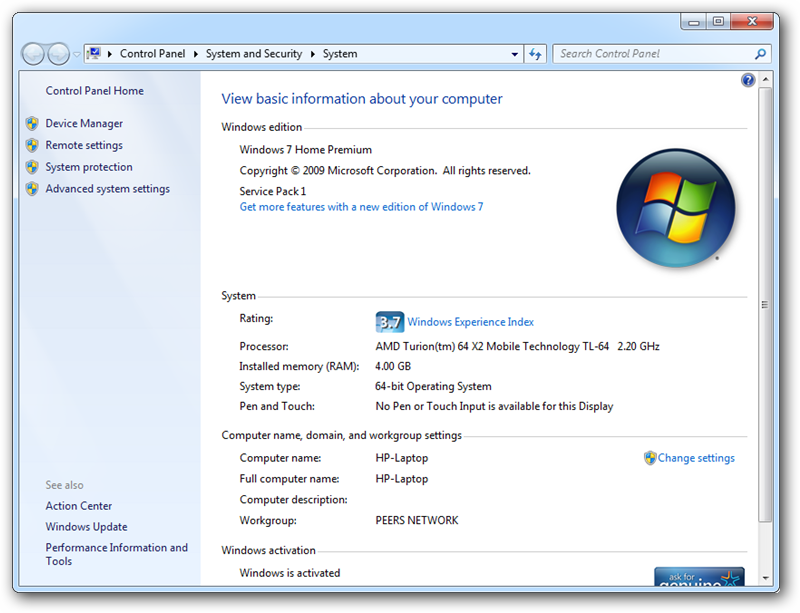
Note that this won’t work if you have a version of Windows that came preinstalled with your computer. Also make sure you download the correct version of Windows 7 for your needs – to find out which edition (Home Premium, Professional or Ultimate) and type (32-bit or 64-bit) you need, click Start, right-click Computer and select Properties.
This downloadable file is for Windows 7 Professional SP1 64-bit users.
If you’re a Windows 7 user looking to reinstall in the near future, save yourself a bucketful of time and get this now.

Windows 7 Professional SP1 32-bit
Trial Software
Update your Windows 7 Professional 32-bit installation disc
Windows 7 Home Premium SP1 64-bit
Trial Software
Update your Windows 7 Home Premium 64-bit installation disc
Windows 7 Ultimate SP1 32-bit
Trial Software
Update your Windows 7 Ultimate 32-bit installation disc
Windows 7 Home Premium SP1 32-bit
Trial Software
Update your Windows 7 Home Premium 32-bit installation disc

Ubuntu "Raring Ringtail" 13.04 [64-bit]
Open Source
A powerful yet easy-to-use Linux operating system with all the software you need
Ubuntu "Raring Ringtail" 13.04
Open Source
A powerful yet easy-to-use Linux operating system with all the software you need


FreeNAS 8.3.1 (64-bit)
Open Source
FreeNAS turns a computer into a dedicated Network Attached Storage device.


Spotlight: Free Full Software
Ashampoo Burning Studio 2013 (v11.0.6)

Ashampoo Burning Studio 2013 is a compact, simple, but surprisingly feature-packed disc burning suite.
The program makes it easy to create simple data discs and audio CDs, for instance: just drag and drop your files onto the list area and you'll be burning the finished disc in a couple of clicks.
That's just the start, though. Burning Studio 2013 can also create data discs with customised, interactive multi-page menus, perfect if you'd like a more professional way to share and present the disc contents.
A built-in backup tool allows you to create backups which may be encrypted, compressed, and span several CDs, DVDs and Blu-rays.
And there are modules to create VCD or SVCD video projects; burn video DVDs or Blu-ray discs from prepared folders; create, browse or burn disc images (ISO, CUE/ BIN and Ashdisc formats are supported); copy discs, erase them, design and print disc covers, labels and booklets, and more.
The focus throughout is on ease of use, though, and so Ashampoo Burning Studio 2013 remains very straightforward, whatever you're doing. Most disc projects are created via the same simple interface, and for the most part all you have to do is drag and drop the necessary files. But experts will find more advanced options are only a click away, and if you need to then you can set ISO and UDF version, enable Joliet, make a disc bootable and more.
Note the download here will take you to the Downloadcrew Software Store where you can download Burning Studio 2013.


 E-mail
 RSS
RSS Twitter
 Facebook
Free Or Trial Software?
Posted by: Indy Jones, 28 September 2011 17:45
This is labeled as both Free and Trial Software. And so are the rest of the Win 7 SP1. Can the editor clear this up whether its free or paid. Confusing!!
www.downloadcrew.com reply:
It's not that confusing? It's free to download. But unless you've got a Windows 7 serial code, then it will only work as a trial.
ie. these are simply SP1 discs for existing Windows 7 owners. Free to download, you don't need to buy, but unless you enter a code and activate, then they will time out.